 Table of content
Огляд
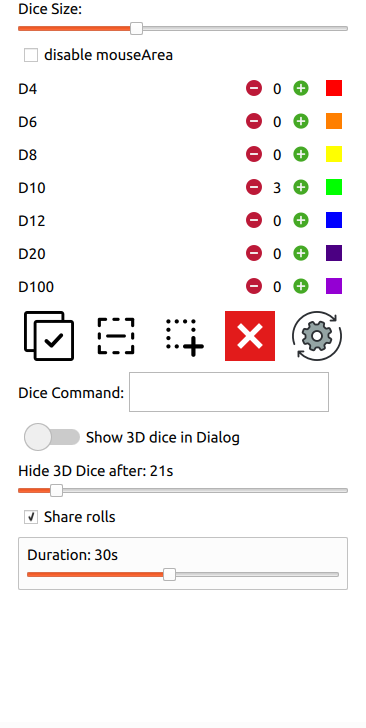
Можливості
- Roll dice from mouse move
- Manage all types of physical dice commonly use in RPG [d4,d6,d8,d10,d12,d20,d100]
- Adjust dice's size
- Adjust dice color (on new ones only)
- Add as many dice as you need/want
- Manage dice selection
- Collide detection
- Share result in 3D (must be activated)
- Auto computation of result value (and display it in the global chatroom)
- Позначити все
- Зняти позначення з усього
- Вилучити усі кістки
- Reset colors and parameters
- Позначення за зоною
Скорочення
| Піктограма | Дія | Скорочення |
|---|---|---|
 | Позначити все | System's Standard, often: Ctrl+A |
 | Зняти позначення з усіх | Ctrl+Shift+A |
 | Прямокутний вибір | Ctrl+r |
 | Вилучити усі кістки | немає |
 | Reset color and size settings | немає |
Демонстрація
Open or Hide
Зміна розміру
Add dice
Змінити колір
Позначення за зоною
Команда викидання кістки
Rolling 3D dice tries to give the exact same feeling that playing on a table, and rolling some dice. As Rolisteam is a software, it can do more than just simulate a real table. Computation can be done with the dice result.
Let's say, you must roll !2d100+65. Of course, you can run this command in the chatroom but in 3D, it's so much more fun. In the 3D panel, you add 2 d100. In the Dice command field, you add +65. Then, select your dice and roll them.
Rolisteam computes the value of your roll and adds 65 to it.
(As a reminder d100 can get this value: [10,20,30,40,50,60,70,80,90,00], 00 means 100).
Please, pay attention that the +65 will be added for all next roll (except if you change or erase the value).
Як це працює?
Dice3d is based on physical 3D engine to get the random value.
Known issues
As dice3d is new in Rolisteam. There are few issues.
1. I can't click anywhere when the dice3d is active.
Yes, it is true for the version 1.10, it will be fixed in the future. There are many workarounds.
- Don't forget to hide the dice3d panel when you have rolled some dice.
- Adjust the duration of the timer (see upper on this page).
- Activate the dice3d as a regular window (see upper on this page).
- Final option, disable dice3d from the preferences panel.
2. When Dice3D is active, things are getting messy: static, slowness and so on…
Your system doesn't allow window control programmatically. In this case, we suggest to activate the dice3d as a regular window. Then, it will be possible to move the window.
3. How to disable dice3D
From rolisteam settings, you can hide the button. It will be impossible to open dice3d's panel by mistake.
4. It takes too long to get the results
In some cases, the dice may have stopped on one value but the system still believes the dice is still rolling. Changing the size may help.