 Table of content
Огляд

This panel lists all connected players and their characters.
The first player on the list is always the local player (you).
The GM is indicated by a darker background (on standard look and feel). The first level of names are players. Player can have many characters.
How to identify the GM
GM has a gray background in the list of players. Additionally, there are no characters below the GM.
Контекстне меню
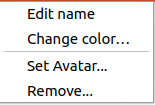
Contextual menu offers direct access to edit actions (such as change name or color, or avatar).
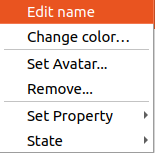
On characters, GM can change more properties of the character.
How to change
Назва
- GM can change name of anyone (players and characters).
- Player can only edit his player and his characters.
Steps to change name:
- Double-click on name you want to change.
- Start editing the cell.
- Press
Enterto validate
Колір
Double-click on the color, a color selector dialog appears.
Аватар
Right-click on character, Select Set Avatar….
A file selector dialog appears. Use it to select your avatar *.jpg, *png, *.bmp.
Персонаж на карті

GM can drag and drop any characters. Players can drag and drop their own character.