 Table of content
Огляд
We saw previously how the campaign works, how to create battle maps and character sheet. So now, let's talk about the bad guys.
On the right-edge of Rolisteam, there are several tabs. They all have an icon to identify them.
Here, we are talking about the antagonist panel with this icon:  (the third one).
This panel can be seen as the non-playable characters database. You can add as many characters as you want. Each NPC have the own avatar and name. You can edit it to define the character sheet of the NPC.
Можливості:
- Додати персонаж
- Клонувати персонажа
- Вилучити персонаж
- Edit Token (initiative, skills, actions…)
- Змінити аватар
- Show/Hide columns (see below)
- Складний пошук
- Description and tags
- GM only information on the NPC
- Drag and drop to map, mindmap etc.
Add new antagonist
- Click on the
 add button
 - New empty line must appear
- Add name and/or avatar
- Display any columns to edit the value.
Редагувати жетон
- Right-click on the NPC
- Select
Edit token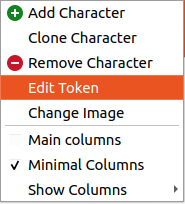
- Edit values:
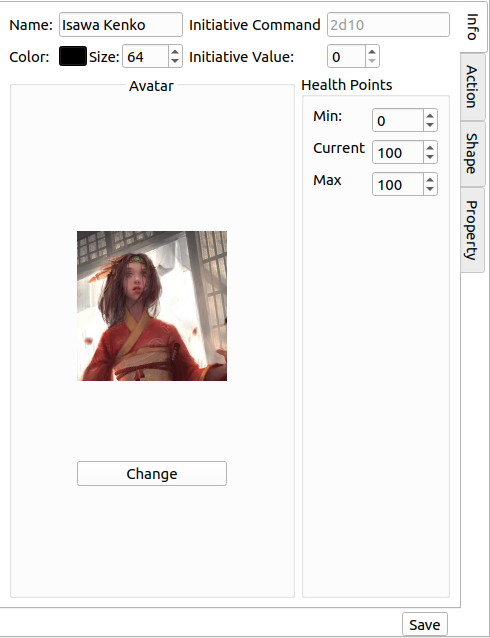
- Колір
- Розмір
- Команда ініціативи
- and so on
- Add Actions [optional]
- Add properties [optional]
- Add shapes [optional]
- Save (returns to antagonist view)
Search and Advanced Search
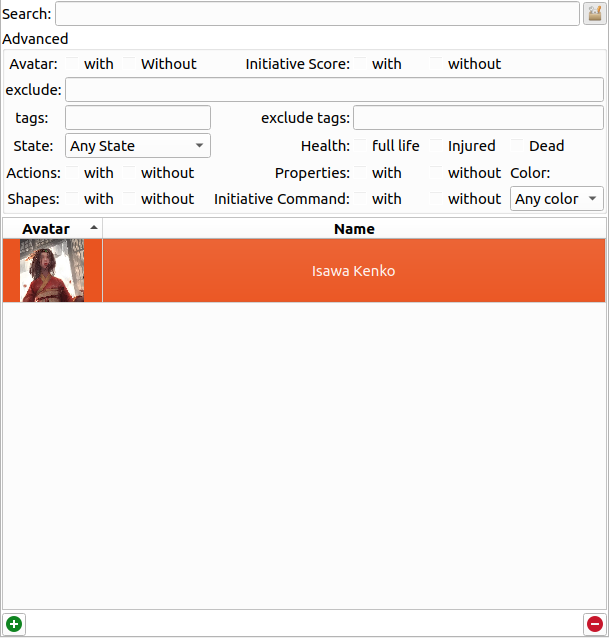
You can define a pattern to search for. Rolisteam is looking matching pattern against the name or the description of the character.
To switch to the advanced search, just click on the button on the right. The panel appears, and you can tune your criteria in order to get the expected result.
This is a table of all criteria:
| Критерії | Опис |
|---|---|
| Аватар | Show characters [With or without] avatar |
| Рахунок ініціативи | Показати персонажів із початковим рахунком або без нього |
| Виключити | Exclude characters matching this pattern |
| Мітки | Вивести список символів із цими мітками |
| Виключити мітки | Приховати персонажів із цими мітками |
| Стан | Показати персонажів із вибраним станом |
| Дії | Показати персонажів із діями або без дій |
| Форми | Показати персонажів із формами або без них |
| Здоров'я | Показати персонажів із вибраним станом здоров'я: повністю живий, поранений або мертвий |
| Властивості | Показати персонажів із властивостями або без них |
| Команда ініціативи | Показати персонажів із командою ініціативи або без неї |
| Колір | Показати персонажів із вибраним кольором |