 Table of content
Підручники
Як вступ до можливостей rolisteam та способів користування ним, цей підручник має відповісти на багато ваших запитань.
Ігровий майданчик
Щоб грати разом із Rolisteam, усі учасники мають приєднатися до одного віртуального місця. Ви можете або організувати гру, або приєднатися до гри. Їм також потрібно визначити свою роль у грі: організатор або гравець. Під час створення профілю слід вибрати режим з'єднання.
| Роль/З'єднання | Хостинг | Долучення |
|---|---|---|
| Господар гри | Так | Так |
| Гравець | Так | Так |
Усі можливі конфігурації
- Організатор гри і місце гри
- Організатор гри і долучення до гри
- Гравець і місце гри
- Гравець і долучення до гри
Давайте створимо профіль і детально розглянемо, що слід визначити, щоб використати усі можливості.
У будь-якому випадку, ви повинні визначити такі поля: (згори вниз)
Додайте ваш профіль
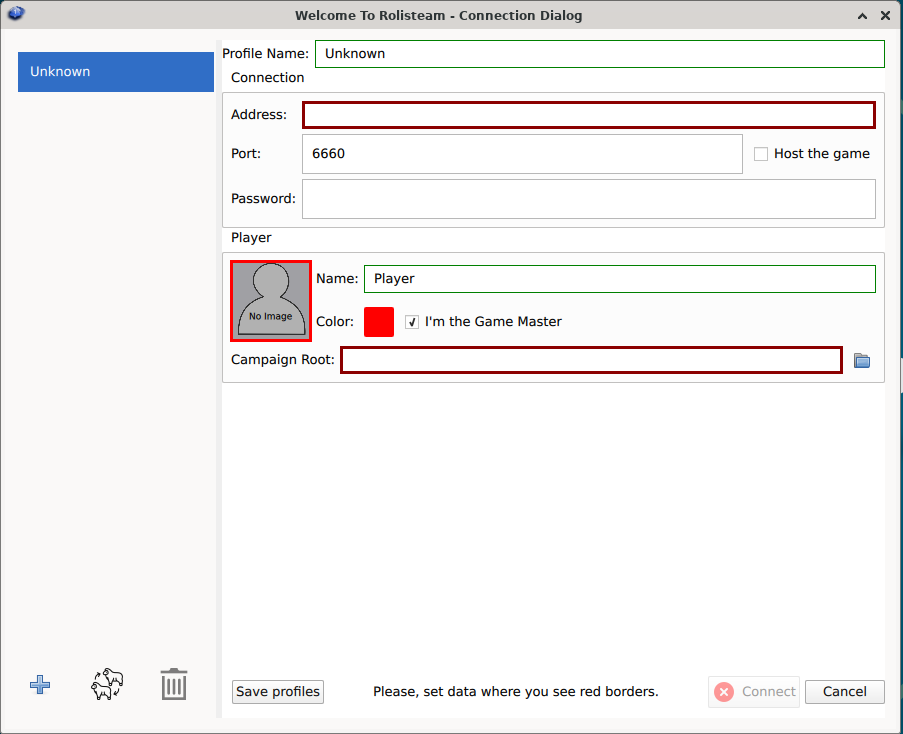
| id | Поле | Опис | Хостинг | Долучення | Господар гри | Гравець |
|---|---|---|---|---|---|---|
| 0 | Список профілів | список усіх профілів | ||||
| 1 | Назва профілю | Назва для ідентифікації цієї гри. Наприклад «Гра у понеділок», L5R | Так | Так | Так | Так |
| 2 | Назва вузла | IP-адреса або назва вузла для долучення до сервера: 80.80.90.70 або rolisteam.blog.com | Ні | Так | ||
| 3 | Port | Визначає типове значення порту з'єднання: 6660 | Так | Так | ||
| 4 | Пароль | Встановіть пароль до гри. Щоб налаштувати гру без пароля. Ви можете залишити цю частину порожньою. | Так (його визначення) | Так (помилковий пароль завадить з'єднанню) | Так | Так |
| 5 | Організатор гри | Має бути позначено, щоб стати організатором гри | Позначено | Не позначено | ||
| 6 | Ім'я гравця | Ваше ім'я або псевдонім (який можна буде змінити у грі) | Так | Так | Так | Так |
| 7 | Колір гравця | Виберіть колір, який відповідає вам (його можна змінити в грі) | Так | Так | Так | Так |
| 8 | Зображення гравця | Натисніть на сіру частину — ви зможете вибрати зображення в діалоговому вікні зображення. (це можна змінити в грі) | Так | Так | Так | Так |
| 9 | Я власник гри | Визначити ваші профіль як профіль організатора гри | Так | Ні | ||
| 10 | Шлях до кампанії | Шлях до каталогу, де буде збережено кампанію. | Так | Ні | ||
| 11 | Ім'я персонажа | Ім'я вашого персонажа (яке можна буде змінити у грі) | Так | |||
| 12 | Колір персонажа | Виберіть колір, який відповідає вам (його можна змінити в грі) | Так | |||
| 13 | Зображення персонажа | Натисніть на сіру частину — ви зможете вибрати зображення в діалоговому вікні зображення. (це можна змінити в грі) | Так | |||
| 14 | Додати профіль | Типово, у Rolisteam є один профіль, але ви можете додати ще | Так | Так | Так | Так |
| 15 | Скопіювати профіль | Виберіть профіль і створіть його копію. Усі дані буде використано повторно. | Так | Ні | ||
| 16 | Вилучити профіль | Вилучити позначений профіль | Так | Ні | ||
| 17 | Зберегти профіль | Якщо ви виконуєте багато дій, не забувайте досить часто зберігати дані | Так | Ні | ||
| 18 | З'єднатися | Коли ваш профіль готовий, ви можете натиснути цю кнопку, щоб встановити з'єднання та гру. | Так | Ні | ||
| 19 | Скасувати | Вийти з програми. Зміни не буде збережено. | Так | Ні | ||
У
Переконайтеся, що позначено відповідний пункт.
Зберегти і з'єднатися
Коли ваш профіль повністю визначено, стане активною кнопка «З'єднатися». Ви завжди можете натиснути кнопку «Зберегти профіль» і спробувати встановити з'єднання.
Якщо ви є організатором гри, Rolisteam відкриється безпосередньо. В іншому випадку, Rolisteam спробує зв'язатися із сервером; якщо rolisteam з'явиться, вас з'єднано.
Внутрішнє тестування до справжньої гри
Наполегливо рекомендуємо протестувати Rolisteam перед тим, як організовувати реальну гру. Для цього запустіть rolisteam двічі, спочатку для організації гри, а потім від імені клієнта/гравця. У цьому випадку поле адреси має містити localhost.
Тепер ви можете поекспериментувати з Rolisteam та подивитися, як це виглядатиме на екранах ваших гравців.
Налаштування
Rolisteam — це програмне забезпечення, яке може працювати на багатьох платформах. Ви можете скористатися ним у всіх 3 основних системах: Windows, GNU/Linux та MacOs. Його написано на C++ з використанням бібліотеку Qt. Rolisteam — це віртуальний стіл для спільної гри з віддаленими людьми. Один з гравців повинен надати стіл (бути сервером). Усі інші мають приєднатися до його столу (сервера).
Як ви, можливо, знаєте, для TTRPG може знадобитися організатор гри. У rolisteam ця роль має більше влади та відповідальності.
Вирішення проблем
Організатор гри
За допомогою rolisteam можна організувати гру на будь-якому комп'ютері. Будь ласка, скористайтеся описаними нижче кроками.
Долучіться до інтернет-сервера
Спільноти гравців/рольових ігор тепер можуть встановлювати сервер rolisteam на віддалений сервер. Як і будь-який сервер відеоігор. Будь ласка, перейдіть до списку серверів, щоб дізнатися про онлайн-сервери. Перелік є неповним. Зв'яжіться з нами, щоб додати свій сервер до списку.
Якщо ви хочете встановити сервер rolisteam для вашої спільноти, ознайомтеся із настановами тут
Перевірка можливості з'єднання
ЗРОБИТИ: виконати тестування
Ми наполегливо рекомендуємо перевірити з’єднання перед першою грою. Тому ми розробили тест з’єднання, щоб дізнатися, чи пропускає ваша мережа вхідні з’єднання до Rolisteam.
Встановіть IP-адресу та порт на вебсторінці та натисніть кнопку «Перевірити».
Відповіддю має бути Good News! Connection succeed!.
Будь-яка інша відповідь означає, що з'єднання не працює.
Мій гравець не може долучитися!
Якщо ваші гравці не можуть зв’язатися з вашим сервером, це означає, що вам потрібно налаштувати мережевий пристрій для переспрямування порту на ваш комп’ютер.
Процедура цього дуже відрізняється для різних надавачів інтернет-послуг. Будь ласка, знайдіть в інтернеті «Переспрямування портів + назва вашого інтернет-провайдера».