 Table of content
Vista general
Anteriorment hem vist com funciona la campanya, com crear mapes de batalla i fulls de personatges. Així que ara, parlem dels dolents.
A la vora dreta del Rolisteam, hi ha diverses pestanyes. Totes tenen una icona per a identificar-les.
Aquí, estem parlant del plafó d'antagonistes amb aquesta icona:  (la tercera).
Aquest plafó es pot veure com la base de dades de personatges no jugables. Podeu afegir tants personatges com vulgueu. Cada PNJ té el seu avatar i nom propi. Podeu editar-ho per a definir el full de personatge del PNJ.
Característiques:
- Afegir un personatge
- Clonar el personatge
- Eliminar el personatge
- Editar el testimoni (iniciativa, habilitats, accions…)
- Canvi d'avatar
- Mostra/oculta les columnes (vegeu més avall)
- Cerca avançada
- Descripció i etiquetes
- Informació només del DJ sobre el PNJ
- Arrossegar i deixar anar al mapa, mapa mental, etc.
Afegir un antagonista nou
- Feu clic en el botó
 d'afegir
 - Ha d'aparèixer una línia nova buida
- Afegiu un nom i/o avatar
- Mostreu qualsevol columna per a editar el valor.
Edició de testimoni
- Feu clic amb el botó dret al PNJ
- Seleccioneu
Edició de testimoni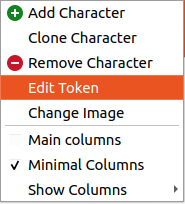
- Edició de valors:
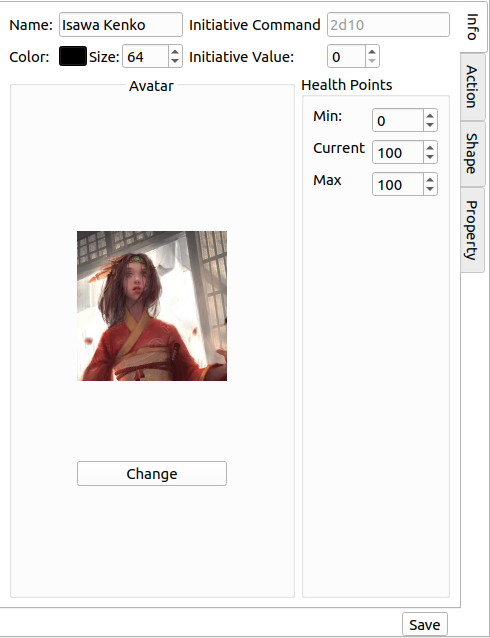
- Color
- Mida
- Ordre d'iniciativa
- etcètera
- Afegeix accions [opcional]
- Afegeix propietats [opcional]
- Afegeix formes [opcional]
- Desa (tornarà a la vista d'antagonista)
Cerca i cerca avançada
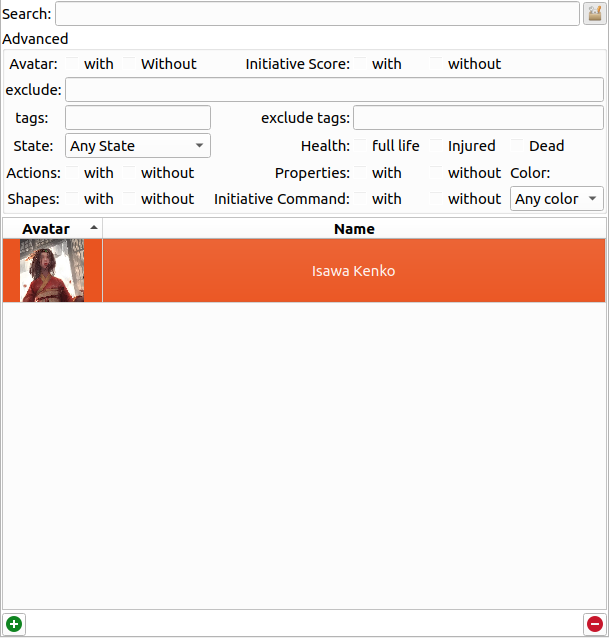
Podeu definir un patró a cercar. El Rolisteam busca un patró que coincideixi amb el nom o la descripció del personatge.
Per a canviar a la cerca avançada, només cal fer clic al botó de la dreta. Apareixerà el plafó i podreu afinar els criteris per a obtenir el resultat esperat.
Aquesta és una taula de tots els criteris:
| Criteris | Descripció |
|---|---|
| Avatar | Mostra els personatges [amb o sense] avatar |
| Puntuació d'iniciativa | Mostra només el personatge [amb o sense] puntuació d'iniciativa |
| Exclou | Exclou els personatges que coincideixin amb aquest patró |
| Etiquetes | Llista els personatges amb aquestes etiquetes |
| Exclou etiquetes | Oculta els personatges amb aquestes etiquetes |
| Estat | Mostra els personatges amb l'estat seleccionat |
| Accions | Mostra els personatges amb o sense accions |
| Formes | Mostra els personatges [amb o sense] formes |
| Salut | Mostra els personatges en l'estat de salut seleccionat: vida completa, ferits o morts |
| Propietats | Mostra els personatges [amb o sense] propietats |
| Ordre d'iniciativa | Mostra els personatges [amb o sense] ordre d'iniciativa |
| Color | Mostra els personatges amb el color seleccionat |