 Table of content
Vista general
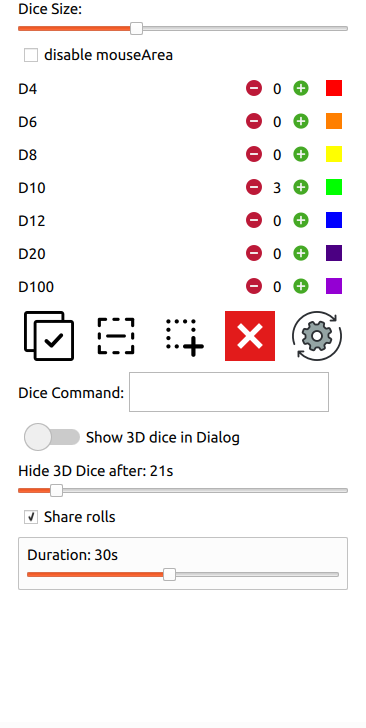
Característiques
- Mou els daus a partir del moviment del ratolí
- Gestiona tots els tipus de daus físics que s'utilitzen habitualment a RPG [d4,d6,d8,d10,d12,d20,d100]
- Ajusta la mida dels daus
- Ajusta el color dels daus (només en els nous)
- Afig tants daus com necessiteu/vulgueu
- Gestiona la selecció de daus
- Detecció de col·lisions
- Compartix el resultat en 3D (s'ha d'activar)
- Càlcul automàtic del valor del resultat (i mostrar-lo a la sala de xat global)
- Selecciona-ho tot
- Desselecciona-ho tot
- Elimina tots els daus
- Restablix els colors i els paràmetres
- Selecció per zona
Drecera
| Icona | Acció | Drecera |
|---|---|---|
 | Selecciona-ho tot | Estàndard del sistema, sovint: Ctrl+A |
 | Desselecciona-ho tot | Ctrl+Majús+A |
 | Selecció rectangular | Ctrl+R |
 | Elimina tots els daus | cap |
 | Restablix la configuració del color i la mida | cap |
Demostració
Obri o oculta
Canvia la mida
Afig un dau
Canvia el color
Selecció per zona
Ordre del dau
La tirada de daus en 3D intenta donar la mateixa sensació que jugar sobre una taula, i tirar els daus. Com que Rolisteam és un programari, pot fer alguna cosa més que simular una taula real. El càlcul es pot fer amb el resultat dels daus.
Diguem que heu de tirar !2d100+65. Per descomptat, podeu executar esta ordre a la sala de xat, però en 3D, és molt més divertit. En el quadro 3D, afegiu 2 d100. Al camp d'ordres de dau, afegiu +65. Després, trieu els vostres daus i tireu-los.
Rolisteam calcula el valor de la tirada i n'afig 65.
(Com a recordatori d100 pot obtindre este valor: [10,20,30,40,50,60,70,80,90,00], 00 vol dir 100).
Cal tindre en compte que el +65 s'afegirà a tota la tirada següent (excepte si canvieu o esborreu el valor).
Com funciona?
El Dice3d es basa en un motor 3D físic per a obtindre el valor aleatori.
Problemes coneguts
Com dice3d és nou a Rolisteam, hi ha poques qüestions.
1. No puc clicar enlloc quan el «dice3d» està actiu.
Sí, és cert per a la versió 1.10, es corregirà en el futur. Hi ha moltes solucions alternatives.
- No vos oblideu d'ocultar el quadro «dice3d» quan hàgeu tirat alguns daus.
- Ajusteu la duració del temporitzador (vegeu més amunt en esta pàgina).
- Activeu el «dice3d» com a finestra normal (vegeu més amunt en esta pàgina).
- Opció final, desactiveu el «dice3d» des del quadro de preferències.
2. Quan el Dice3D està actiu, les coses es desordenaran: estàtica, lentitud, i altres…
El vostre sistema no permet el control de finestres de forma programàtica. En este cas, suggerim activar el «dice3d» com a finestra normal. Llavors, serà possible moure la finestra.
3. Com desactivar el «dice3D»
Des de la configuració de Rolisteam podeu ocultar el botó. Serà impossible obrir el quadro del «dice3d» per error.
4. Es tarda massa temps a obtindre els resultats
En alguns casos, els daus poden haver-se parat en un valor, però el sistema encara creu que els daus estan rodant. Canviar la mida pot ajudar.