 Table of content
Vista general

Este quadro llista tots els jugadors connectats i els seus personatges.
El primer jugador de la llista és sempre el jugador local (vós).
El DJ s'indica amb un fons més fosc (a l'aspecte i el comportament estàndard). El primer nivell de noms són els jugadors. Un jugador pot tindre molts personatges.
Com identificar el DJ
El DJ té un fons gris a la llista de jugadors. A més, no hi ha personatges per davall del DJ.
Menú contextual
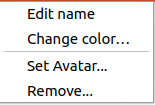
El menú contextual oferix accés directe per a editar accions (com canviar el nom o el color o l'avatar).
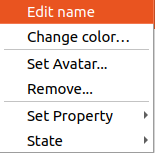
Als personatges, el DJ pot canviar més propietats del personatge.
Com canviar-ho
Nom
- El DJ pot canviar el nom de qualsevol persona (jugadors i personatges).
- El jugador només pot editar el seu jugador i els seus personatges.
Passos per a canviar el nom:
- Feu doble clic damunt del nom que voleu canviar.
- Inicia l'edició de la cel·la.
- Premeu
Retornper a validar
Color
Feu doble clic damunt del color, apareixerà un diàleg del selector de color.
Avatar
Cliqueu amb el botó dret damunt del personatge, trieu Establiu l'avatar….
Apareix un diàleg de selecció de fitxers. Utilitzeu-lo per a seleccionar el vostre avatar *.jpg, *png, *.bmp.
Personatge en el mapa

El DJ pot arrossegar i deixar anar qualsevol personatge. Els jugadors poden arrossegar i deixar anar el seu propi personatge.