 Table of content

Rolisteam v1.10 presenta un mòdul de missatgeria instantània completament nou. S'ha escrit des de zero. Proporciona característiques noves.
Mostra o oculta el quadro de missatgeria instantània
Des de Rolisteam v1.10, el quadro de missatges instantanis es pot obrir des d'este  a la barra d'eines de Rolisteam.
Envia missatges

Com podeu esperar, podeu escriure el missatge a la part inferior, i prémer Retorn o clicar damunt Envia.
Envia imatges


Si envieu un URL d'una imatge, la imatge apareixerà a la pantalla.

Cal que siga una imatge, l'URL cal que acabe amb una extensió d'imatge: .jpg, .png, .bmp…
Envia enllaços
Si envieu un URL, s'hi podrà clicar. Quan s'hi clique, obriu el lloc web a la pàgina web de Rolisteam.
Sales de xat predeterminades
En l'inici, Rolisteam afig automàticament diverses sales de xat. La primera sala de xat és sempre la sala de xat Global on tots els jugadors i el director de joc parlen junts. Després, seguixen sales de xat individuals.
No es poden tancar sales de xat predeterminades.
Sala de xat global
Esta sala de xat reunix a tothom. Quan una persona nova es connecta amb el servidor s'afig automàticament a la sala de xat global.
Sala de xat individual
Rolisteam prepara sales de xat individuals. És la millor manera de fer-ho quan es vol xatejar amb només una persona.
Afegir una sala de xat nova
Per a afegir una sala de xat aneu fins a Configuració > Afig una sala de xat.
Apareixerà un diàleg. A partir d'ací, podeu establir el nom de la sala de xat nova i triar qui és el participant d'esta sala de xat. Si trieu Tothom, tots els jugadors estaran involucrats, fins i tot els que encara no estan en el joc. Rolisteam assegura que tots els jugadors del joc rebran els missatges. A continuació, podeu permetre o denegar la sala de xat nova per cada jugador en el joc.

Les sales de xat afegides es poden tancar, utilitzant la creu del cantó.
Tirada de daus
Per a les ordres de tirada de daus, heu de prefixar la vostra ordre amb !. El resultat es mostra en marc. Podeu veure els detalls clicant damunt del símbol de la dreta.
Dau en 3D
Quan algú ha tirat daus utilitzant el sistema de daus 3D. El resultat apareixerà així:
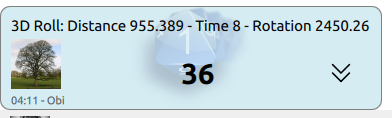
Com que el dau en 3D és una característica nova, preferim notificar als jugadors que s'ha utilitzat. Mostrem algunes mètriques per tal d'assegurar-nos que els daus es tiren prou. Com més grans siguen els números, és millor.
- Distància feta pels daus entre el botó de prémer i deixar anar del ratolí.
- Hora en segons perquè el sistema s'estabilitze
- Gir: suma de canvis de gir dels daus.
Canvia la disposició de la sala de xat


De manera predeterminada, la sala de xat es mostra utilitzant la pestanya. En este moment només es pot veure una sala de xat. Podeu canviar-ho. El menú contextual oferix totes les característiques sobre la disposició de la sala de xat.
Com veure dues sales de xat al mateix temps
En el menú contextual, heu de clicar damunt Dividix XXXX (on XXXX és el nom de la sala de xat actual).
Mou cap a una sala de xat
Quan tingueu dos (o més) grups de sales de xat, podeu moure una sala de xat d'un grup a un altre. El grup sense sala de xat es tanca automàticament.
Fusiona el grup en el principal
Fusionar significa moure la sala de xat al grup principal. El grup sense sala de xat es tanca automàticament.
Menú de sala de xat

En el cantó superior dret, podeu veure un  .
.
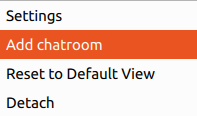
Apareix este menú:
1. Configuració
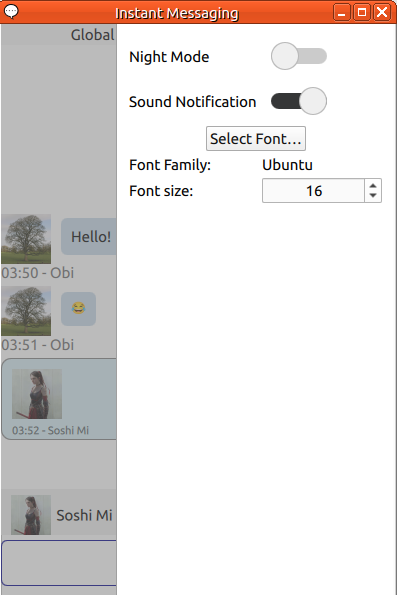
- Mode fosc
- Mida de la lletra
- Notificació de so
La configuració és estrictament local. Els vostres jugadors no rebran els vostres canvis.
2. Afig una sala de xat
Ací, la finestra emergent per a seleccionar qui voleu en esta sala de xat addicional.
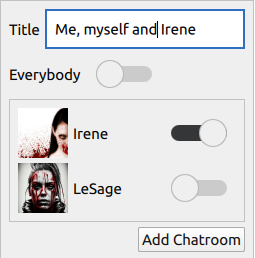
(Nota: Està disponible la creació manual d'una sala de xat amb una altra persona, fins i tot si ja teniu una sala de xat dedicada per a parlar amb ella)
3. Reinicia a la vista predeterminada
Restablix tota la disposició. Totes les sales de xat tornen al grup principal.
4. Separa
Separa la finestra de missatgeria instantània. Després podeu posar-la fora de Rolisteam.