 Table of content
Guies d'aprenentatge
Com a introducció del que el rolisteam pot fer i com utilitzar el rolisteam, esta guia d'aprenentatge hauria de respondre a moltes de les preguntes.
La zona de joc
Per a jugar conjuntament amb Rolisteam. Tots els participants han d'unir-se al mateix lloc virtual. Podeu allotjar el joc o unir-vos a un joc. També cal definir el paper en el joc: DJ o jugador. En crear el vostre perfil, heu de seleccionar el mode de connexió.
| Rol/connexió | Allotjament | Unir-se |
|---|---|---|
| Director de joc | Sí | Sí |
| Jugador | Sí | Sí |
Totes les configuracions possibles
- Director de joc i allotjament
- Director de joc i unir-se
- Jugador i allotjament
- Jugador i unir-se
Configurarem un perfil i veurem amb detall què s'ha de definir per a cobrir totes les possibilitats.
En qualsevol cas, heu de definir els camps següents: (de dalt a baix)
Afegiu el vostre perfil
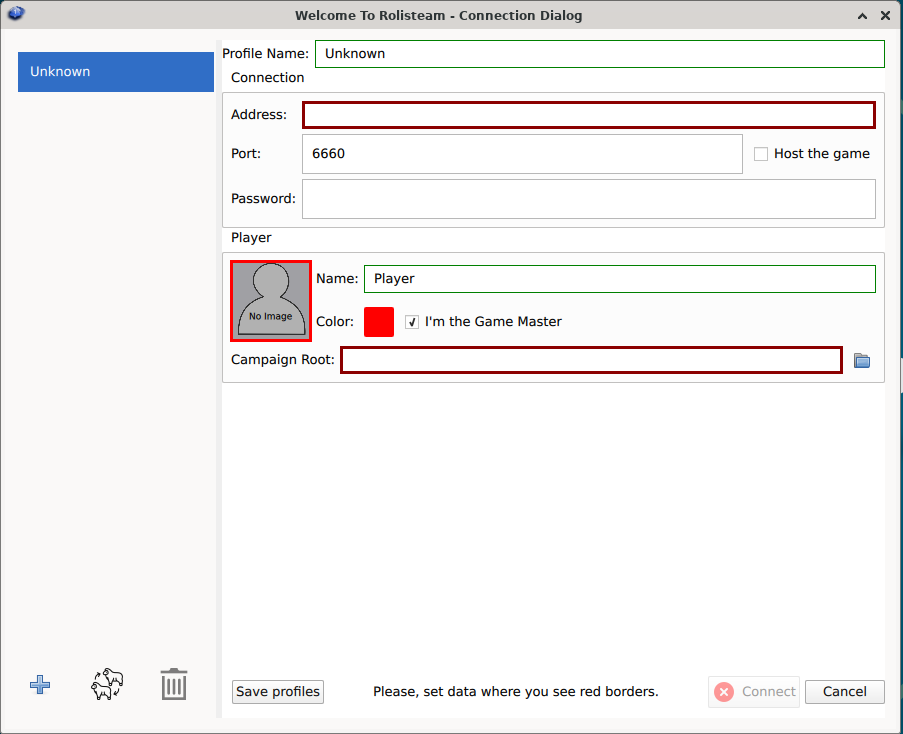
| ID | Camp | Descripció | Allotjament | Unir-se | Director de joc | Jugador |
|---|---|---|---|---|---|---|
| 0 | Llista de perfils | llista de tots els perfils | ||||
| 1 | Nom del perfil | Un nom per a identificar este joc. P. ex., Joc de dilluns, L5R | Sí | Sí | Sí | Sí |
| 2 | Nom de l'amfitrió | Adreça IP o el nom de l'amfitrió per a unir-se al servidor: 80.80.90.70 o rolisteam.blog.com | No | Sí | ||
| 3 | Port | Establix el valor predeterminat del port de connexió: 6660 | Sí | Sí | ||
| 4 | Contrasenya | Establix la contrasenya del joc. Per a configurar una partida sense contrasenya, podeu deixar buida esta part. | Sí (definint-la) | Sí (una contrasenya incorrecta impedirà la connexió) | Sí | Sí |
| 5 | Allotja el joc | S'ha de marcar per a allotjar la partida | Marcat | Desmarcat | ||
| 6 | Nom del jugador | El vostre nom o sobrenom (que es pot canviar en la partida) | Sí | Sí | Sí | Sí |
| 7 | Color del jugador | Trieu un color que vos reflectisca (que es pot canviar en la partida) | Sí | Sí | Sí | Sí |
| 8 | Imatge del jugador | Cliqueu damunt de la part grisa, hauríeu de poder seleccionar una imatge dins del diàleg d'imatges. (que es pot canviar en la partida) | Sí | Sí | Sí | Sí |
| 9 | Soc el director de joc | Definiu el vostre perfil com a director de joc | Sí | No | ||
| 10 | Camí de campanya | El camí cap al directori on s'emmagatzema la campanya. | Sí | No | ||
| 11 | Nom del personatge | El nom del vostre personatge (que es pot canviar en la partida) | Sí | |||
| 12 | Color del personatge | Trieu un color que vos reflectisca (que es pot canviar en la partida) | Sí | |||
| 13 | Imatge del personatge | Cliqueu damunt de la part grisa, hauríeu de poder seleccionar una imatge dins del diàleg d'imatges. (que es pot canviar en la partida) | Sí | |||
| 14 | Afig un perfil | De manera predeterminada, Rolisteam té un perfil, però en podeu afegir més | Sí | Sí | Sí | Sí |
| 15 | Clona un perfil | Trieu un perfil i feu-ne una còpia. Es reutilitzaran totes les dades. | Sí | No | ||
| 16 | Elimina el perfil | Elimina el perfil seleccionat | Sí | No | ||
| 17 | Guarda els perfils | Si esteu fent moltes operacions, no vos oblideu de guardar-les tot sovint | Sí | No | ||
| 18 | Connecta | Quan el vostre perfil estiga llest, es pot clicar damunt d'este botó per a iniciar la connexió i el joc. | Sí | No | ||
| 19 | Cancel·la | Ix de l'aplicació. Els canvis no es guardaran. | Sí | No | ||
Un jugador ha de tindre almenys un personatge. Podeu tindre molts personatges.
Assegureu-vos que la casella de selecció adequada està marcada.
Guarda i connecta
Quan el vostre perfil estiga completament definit, s'hauria d'activar el botó connecta. Sempre podeu clicar damunt del botó Guarda el perfil i després intentar connectar-se.
Si esteu allotjant el joc, Rolisteam s'obrirà directament. En cas contrari, Rolisteam intentarà connectar amb el servidor, si apareix el rolisteam, teniu connexió.
Prova internament abans del joc real
És molt recomanable provar Rolisteam abans d'allotjar un joc real. Per a fer-ho, inicieu el rolisteam dues vegades, primer com a hoste i DJ, després com a client/Jugador. En este cas, el camp d'adreça ha de ser localhost.
Ara, podeu jugar amb Rolisteam i veure com apareixerà a les pantalles del vostre jugador.
Configuració
Rolisteam és un programari de plataforma creuada. Podeu utilitzar-lo en els 3 sistemes principals: Windows, GNU/Linux i MacOs. Està escrit en C++ amb l'entorn de treball Qt. Rolisteam és una taula virtual per a jugar jocs juntament amb persones remotes. Un dels jugadors ha de proporcionar la taula (serà el servidor). Tots els altres s'han d'unir a la seua taula (servidor).
Com ja sabeu, el TTRPG pot requerir un director de joc. En el rolisteam, este rol té més poder i responsabilitats.
Resolució de problemes
Allotja el joc
El joc es pot allotjar amb el rolisteam en qualsevol ordinador. Seguiu estos passos.
Unir-se a un servidor en línia
Les comunitats de Jugadors/RPG ara poden instal·lar el servidor rolisteam a un servidor remot. Igual que qualsevol servidor de videojocs. Aneu fins a la llista de servidors per a conéixer els servidors en línia. No totes estan llistats allí. Poseu-vos en contacte amb nosaltres per a afegir el vostre servidor a la llista.
Si voleu instal·lar el servidor rolisteam per a la vostra comunitat, busqueu ací les instruccions
Prova de connectivitat
PER FER: cal provar
Recomanem fermament provar la connexió abans del vostre primer joc. Així que hem desenvolupat una prova de connexió per a conéixer si la vostra xarxa permet que les connexions entrants arriben a Rolisteam.
Establix l'adreça i el port IP a la pàgina web i cliqueu damunt Prova.
La resposta hauria de ser Bones notícies! Connexió correcta!.
Qualsevol altra resposta significa que no funciona.
Un jugador meu no pot unir-se!
Si els vostres jugadors no poden connectar-ser al vostre servidor. Açò significa que heu de configurar el vostre dispositiu de xarxa per a reenviar el port al vostre ordinador.
El procés per a fer-ho, és molt diferent d'un ISP a un altre. Busqueu en línia «Reenviament de ports + el nom del vostre ISP».