 Table of content
Overview
We saw previously how the campaign works, how to create battle maps and character sheet. So now, let's talk about the bad guys.
On the right-edge of Rolisteam, there are several tabs. They all have an icon to identify them.
Here, we are talking about the antagonist panel with this icon:  (the third one).
This panel can be seen as the non-playable characters database. You can add as many characters as you want. Each NPC have the own avatar and name. You can edit it to define the character sheet of the NPC.
Features:
- Add character
- Clone character
- Remove Character
- Edit Token (initiative, skills, actions…)
- Change Avatar
- Show/Hide columns (see below)
- Advanced search
- Description and tags
- GM only information on the NPC
- Drag and drop to map, mindmap etc.
Add new antagonist
- Click on the
 add button
 - New empty line must appear
- Add name and/or avatar
- Display any columns to edit the value.
Edit token
- Right-click on the NPC
- Select
Edit token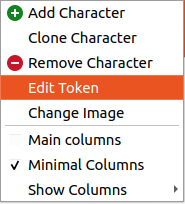
- Edit values:
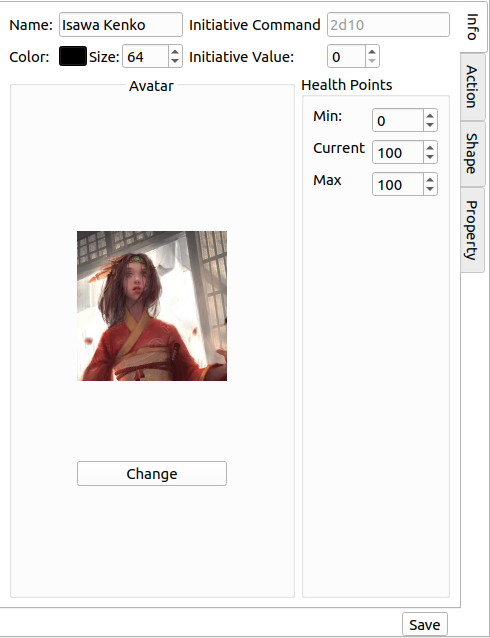
- Color
- Size
- Initiative command
- and so on
- Add Actions [optional]
- Add properties [optional]
- Add shapes [optional]
- Save (returns to antagonist view)
Search and Advanced Search
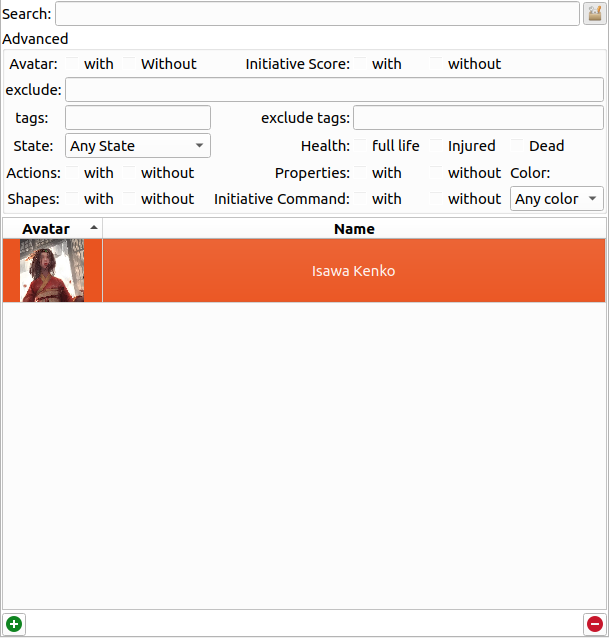
You can define a pattern to search for. Rolisteam is looking matching pattern against the name or the description of the character.
To switch to the advanced search, just click on the button on the right. The panel appears, and you can tune your criteria in order to get the expected result.
This is a table of all criteria:
| Criteria | Description |
|---|---|
| Avatar | Show characters [With or without] avatar |
| Initiative score | Display only characters [with or without] Initiative score |
| Exclude | Exclude characters matching this pattern |
| Tags | List characters with these tags |
| Exclude tags | Hide characters with these tags |
| State | Display characters with selected state |
| Actions | Show characters with or without actions |
| Shapes | Show characters [With or without] Shapes |
| Health | Show characters in selected health state: Full life, injured or dead |
| Properties | Show characters [with or without] Properties |
| Initiative command | Show characters [with or without] Initiative command |
| Color | Show characters with selected color |